

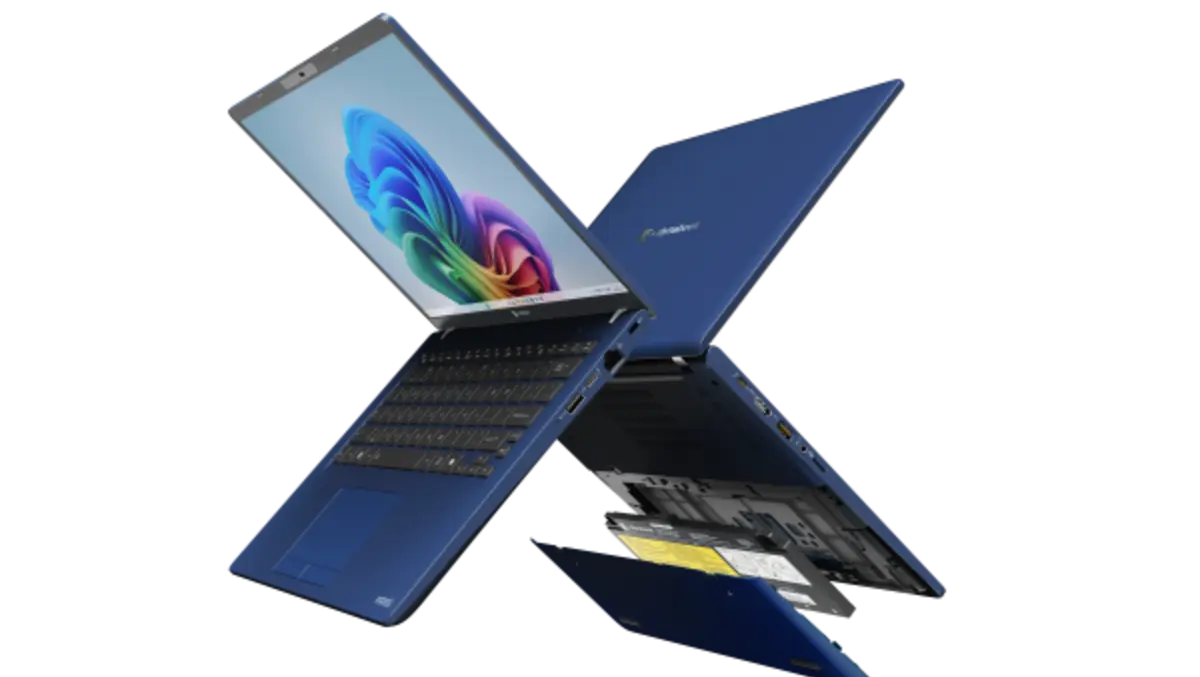
Hands-on review: Dynabook Z40L-N business laptop
Wed, 22nd Apr 2026
Dynabook has launched a new addition to its Portégé series with the Z40L-N.
Performance and connectivity
When I carried the package from my front door, without opening the box, it seemed as if the laptop was missing. That was not the case. Marketed as an AI-powered business laptop under one kilogram, it seems to be much lighter than a kilogram.
It is made from a lightweight magnesium alloy chassis and features 180-degree hinges. This Copilot+ AI-powered PC is designed for portability while featuring an Intel® Core Ultra V processor (Series 2).
Surface temperatures stay comfortable across the palm rest and keyboard, even when the CPU is under pressure.
The finish is a dark blue tone that helps it stand out from more conventional grey business machines.
The design language, however, feels conservative, with relatively thick bezels and a more traditional look than many current laptops.
Powered by USB-C, the laptop features an RJ-45 Ethernet port, a microSD card slot, an additional Thunderbolt 4 port on the right side, with two USB 3.2 Gen 1 Type-A ports, and an HDMI output. The device also supports Intel® Wi-Fi 7.
Battery capacity is around the mid-50Wh mark, which is modest for a 14-inch laptop.
While setup was slow, once organised and customised, the processors kept up with business tasks. The device directly connects to a Microsoft account, bringing Outlook and cross-platform data integration to the user's fingertips right off the bat.
Display quality
The Z40L-N uses a 14-inch IPS panel with a 16:10 aspect ratio and a resolution of 1,920 x 1,200. The taller ratio gives more vertical space, which is useful for documents and web pages. Viewing angles are typical of IPS, with only minor shifts when tilting the screen.
In terms of audio, the Dolby Atmos equipped speakers sound hollow.
Keyboard and trackpad
The keyboard offers a standard layout with good key spacing and clear legends. There is white backlighting, which keeps keys readable in low light.
The touchpad is wide enough for multi-finger gestures and tracks accurately across the surface.
Dedicated touchpad buttons and the lack of a fully integrated click mechanism give it a slightly old-fashioned feel compared with modern glass trackpads.
Flex is minimal across the keyboard deck and lid, giving more confidence than the low weight suggests.
AI power
As a Copilot+ PC, the Z40L-N is set up to support local AI features in Windows, tapping into the Intel NPU as these tools roll out more widely.
This hardware underpins features such as live captions, video effects and privacy tools that run largely on-device rather than relying solely on the cloud. As a Copilot+ PC, it ties into Microsoft's Copilot layer in Windows, which can help draft and tidy emails, summarise notes and perform quick text edits with less lag.
Live Captions is one of the more immediately useful tools, turning speech from calls or videos into text in real time, which helps in noisy environments or with accented speakers.
Gesture control uses the webcam to recognise simple hand movements for skipping slides or pausing media, though it works best as an occasional convenience rather than a full control scheme.
Windows Studio Effects taps the NPU for background blur, auto-framing, eye-contact correction and noise reduction, making long video calls look and sound cleaner without a big performance hit.
On the privacy side, presence detection locks the laptop when you step away and wakes it when you return.
Upgrades and maintenance
The Z40L-N offers more serviceability than many thin-and-light rivals.
The bottom panel is secured with standard screws, allowing access for IT teams or confident users.
The M.2 SSD is replaceable, so storage upgrades or replacements are possible later in the laptop's life.
Memory, however, is soldered, so it is important to choose the right RAM configuration at purchase time.
Verdict
Its strongest differentiators are weight under 1kg, the generous selection of ports and the focus on serviceability.
The main drawbacks are a design that feels dated next to sleeker rivals, a display that is competent rather than class-leading and battery life that is good but not exceptional.
For IT-managed fleets and mobile professionals who value light weight, wired connectivity and a repair-friendly design, it makes a sensible, focused choice