

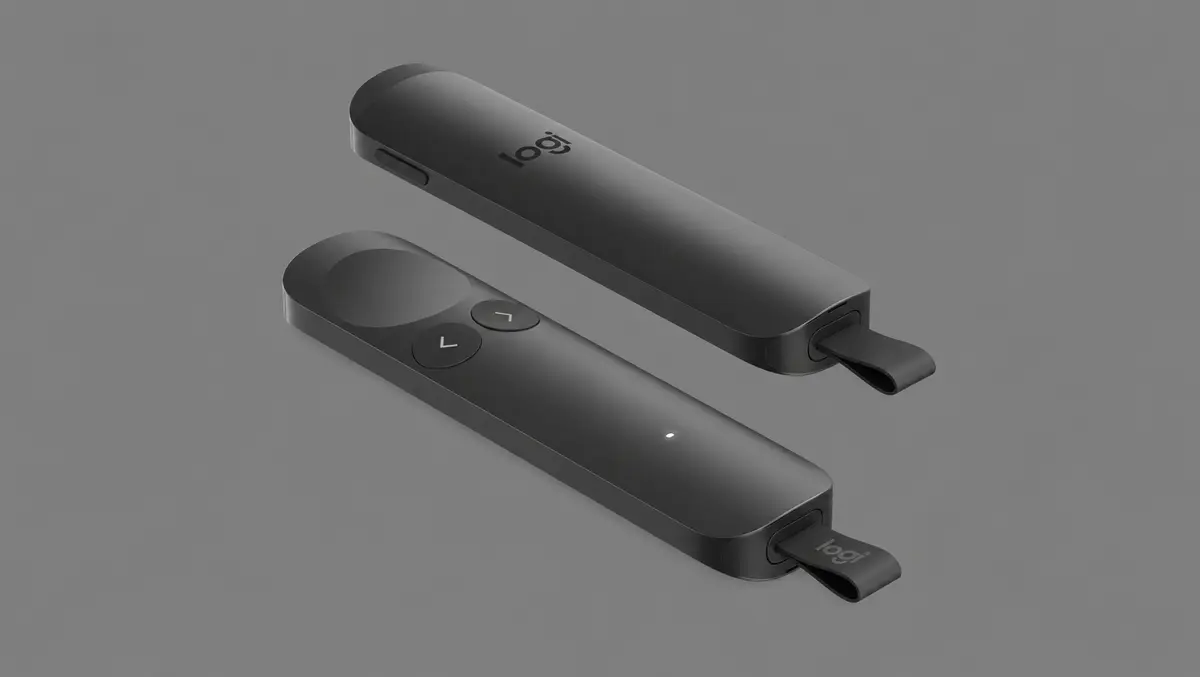

Every professional wants to make a strong first impression. Whether you're presenting to colleagues, clients, or an auditorium full of strangers, having reliable technology in your hands can make a massive difference.
The Logitech Spotlight 2 takes an otherwise humble piece of equipment - a presentation remote - and transforms it into a genuinely smart presentation tool.
First impressions
This really is no ordinary presentation remote. It's sleek, stylish, and boasts an impressive array of features. Unboxing and holding the Spotlight 2 for the first time makes you appreciate the thought that Logitech has put into designing it.
Finished in a low-carbon aluminium for a lower environmental impact, the Spotlight 2 is available in four colours: Graphite, Black, Light Lilac, and Sand. We received the Sand variant, which is almost a faint bronze that looks great while remaining discreet.
There are four buttons in total on the Spotlight 2. On the right-hand side is a customisable Action button, alongside dedicated Next and Back buttons. Logitech has made the Next button concave and the Back button convex, making them easy to distinguish by touch alone. Completing the layout is the immersive haptic force button, which is also concave and is used for digital highlighting.
The Spotlight 2 also features a Class 1 laser for the traditionalists (which can also help to keep your dog entertained for a surprising amount of time).
Product Specifications
- Height: 145mm (with receiver), 125mm (without receiver)
- Width: 30mm
- Depth: 13.5mm
- Weight: 55g
Setup
The box contains just the presentation remote, the Logi Bolt USB-C receiver, and some user documentation. Printed on the inside of the box are easy-to-follow graphics to help you connect the device, either via Bluetooth or the receiver, which can be easily removed from the bottom of the remote by pulling the colour-matched recycled plastic tag.
One you've successfully connected the Spotlight 2 to your device, you simply need to download the relevant Logitech software for your operating system.
To fully appreciate the Spotlight 2, downloading Logitech's Logi Options+ is highly recommended. I had no issues installing it on my Windows laptop, although I did run into a problem on my MacBook that was ultimately resolved by installing a patch Logitech released in January.
Features and real-life use
The Spotlight 2 works seamlessly with the likes of PowerPoint, Apple Keynote and Google Slides.
It feels great in your hand - it's not heavy, but the aluminium finish makes it feel premium and sturdy. The buttons have a nice mechanical sound to them, but they're quiet enough to not distract you from your presentation.
The large immersive haptic force button is the device's standout feature, and it can really make your presentations stand out. A light press brings up the digital laser or cursor, while a harder press allows you to draw attention to your presentation by highlighting, magnifying or even annotating over key points. I found these features to be particularly useful when presenting to colleagues online.
Logi Options+ allows you to fully customise the Spotlight 2. For instance, you can cycle through the above highlighting effects and even customise their size and colour - particularly useful for marketers wanting to keep presentations on-brand.
One unexpected feature within Logi Options+ is a haptics-guided breathing exercise to help you keep focused and calm your nerves before a big presentation.
Battery life is another highlight. Logitech claims up to three months of use from a single charge, while just three minutes plugged in provides around three hours of presentation time.
If you are presenting in a large space, the Spotlight 2 offers 30 metres of range, allowing you to move freely around the stage.
Verdict
The Spotlight 2 is Logitech's flagship presentation remote, and it's easy to see why. At $219.95 NZD (around $199 AUD), it's a considerable investment and undoubtedly aimed at professionals who present regularly.
Presentation remotes aren't usually the most exciting pieces of technology, but the Spotlight 2 proves they don't have to be. It's thoughtfully designed, packed with genuinely useful features and built to a premium standard, making it an easy recommendation for anyone who regularly presents in person or online.