

Hands-on review: Logitech Signature Comfort MK880 keyboard & mouse
Wed, 27th May 2026
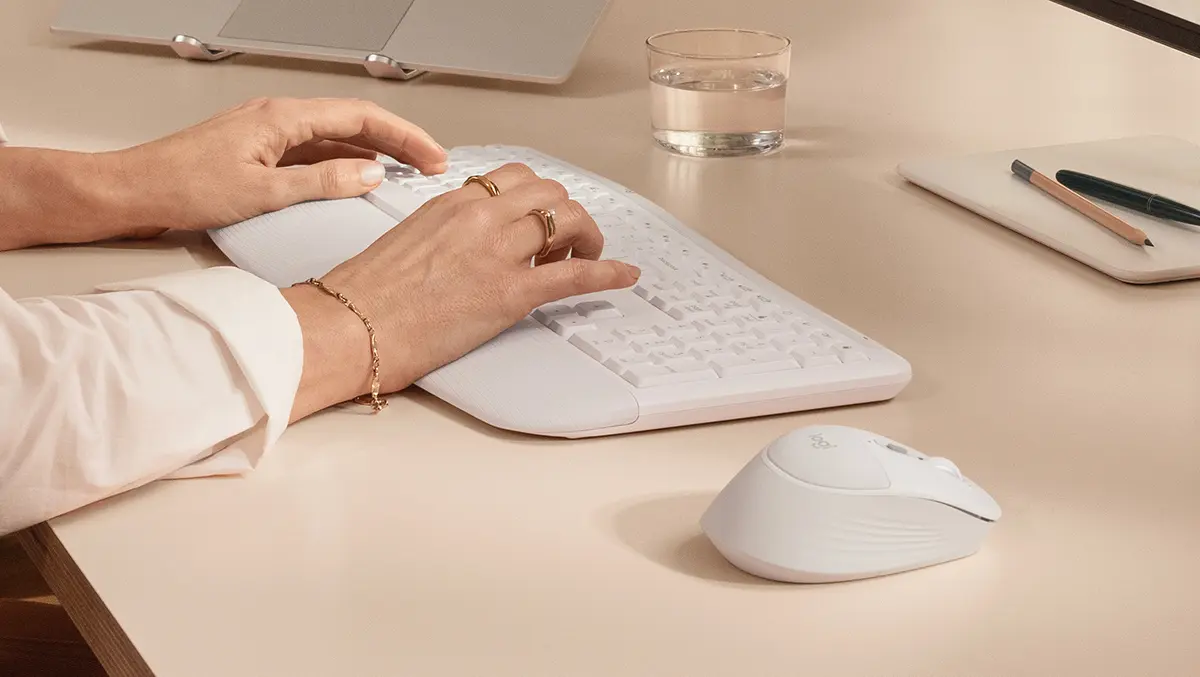
The Logitech Signature Comfort Plus MK880 makes its intentions clear straight away. This is not another ultra-thin desktop combo trying to mimic a laptop keyboard. It is a comfort-focused setup designed for long stretches at a desk.
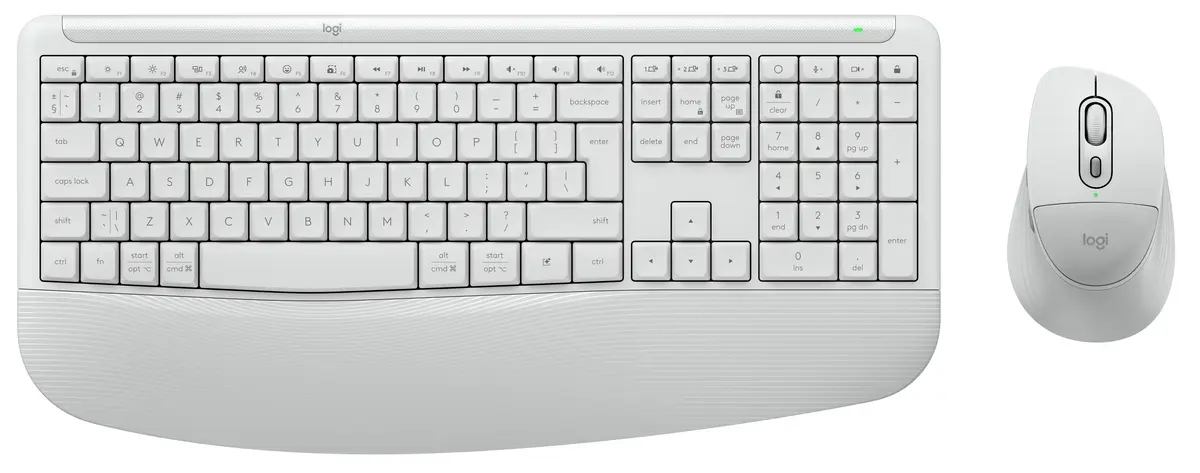
The keyboard uses deeper cushioned keys, a broad palm rest and adjustable typing angles. The mouse follows the same approach. It has a fuller right-handed shape with a built-in palm cushion designed to reduce strain during extended use.
That gives the MK880 a distinct place in Logitech's desktop range. It sits between slim office peripherals and more aggressive ergonomic designs. It feels aimed at users who want better comfort without committing to a split keyboard or vertical mouse.
The design is functional rather than decorative. The keyboard is large and clearly office-oriented. The mouse prioritises hand support over portability. Together, they feel built for daily productivity rather than minimalist desk setups.
Desk setup
One of the stronger aspects of the MK880 is the consistency between the keyboard and mouse. Many office bundles feel mismatched, with a decent keyboard paired with an average mouse. Here, both parts are built around the same idea.
The keyboard stays familiar in the right ways. It uses a full-size layout with a number pad and conventional spacing. That matters for spreadsheet work, finance software and document editing. Users moving from a standard office keyboard should adapt quickly.
The adjustable tilt system is another practical addition. Logitech offers flat, four-degree and eight-degree positions. That flexibility may sound minor, but typing comfort often comes down to small posture changes rather than dramatic ergonomic reshaping.
The combo also suits modern multi-device desks. Many people now work across a laptop, personal desktop and tablet during the same day. Logitech's Easy-Switch system lets users move between up to three paired devices without reconnecting hardware each time.
Typing feel
The keyboard will decide whether the MK880 succeeds. Logitech's comfort-focused keyboards have traditionally prioritised softness and low noise over precision. That works well for some users, though others may find softer membrane keys lacking feedback.
The MK880 leans heavily towards comfort. The deeper cushioned keys should provide a more substantial typing feel than Logitech's slimmer office keyboards. That alone may appeal to users who never adapted to low-profile keys.
The dual-foam palm rest could make a bigger difference than many specifications suggest. Proper wrist support matters during full workdays. A softer resting position can reduce fatigue, especially for users typing continuously for hours.
The quieter typing profile is another focus. The keyboard reduces typing noise, while the mouse uses silent clicks and quieter scrolling. That suits home offices and shared workspaces where constant clatter quickly becomes distracting.
There are limits to this approach. Users who prefer sharper tactile feedback may find the typing experience too soft. The keyboard is also clearly not aimed at enthusiasts looking for mechanical switches, gaming features or premium metal construction.
It is also worth noting what the MK880 does not include. There is no visible backlighting. The keyboard is not especially slim or compact. Portability is not part of the pitch.
Mouse comfort
The mouse may end up being the more interesting half of the bundle. Logitech has placed unusual emphasis on hand support, including what it describes as its first integrated palm cushion.
That feature immediately separates it from flatter office mice. The design uses a sculpted right-handed shape with rubber side grips and a fuller body intended to support the entire hand rather than just the fingertips.
For users who spend long hours navigating documents, browsers and spreadsheets, that could prove more useful than headline productivity features. Hand fatigue often comes from small pressure points building over time. A softer upper surface may genuinely help reduce that strain.
The SmartWheel scrolling system also returns here. Logitech has used this feature across several recent mice. It automatically shifts between precise line-by-line movement and faster free scrolling through long pages or spreadsheets.
The mouse also supports customisation through Logi Options+, including programmable buttons and shortcut functions. Logitech continues to push software integration as part of its broader productivity strategy, particularly around shortcuts and meeting controls.
The shape will not suit everyone. Left-handed users are effectively excluded, and people who prefer smaller fingertip-style mice may find it bulky. Comfort products are always personal. A shape that feels supportive to one user may feel oversized to another.
Quiet focus
The MK880 appears designed around a quieter style of work. Silent clicking, quieter scrolling and softer typing all point towards calmer shared spaces rather than louder enthusiast setups.
That approach makes sense. Many home offices now double as living spaces, and open-plan workplaces continue to prioritise lower noise levels. Quiet peripherals are often appreciated more over time than during a brief demonstration.
The spill-resistant keyboard also adds practical value. It is not a glamorous feature, but it matters in real office environments where coffee cups inevitably end up near keyboards.
Battery life also looks strong. Logitech rates the keyboard for up to three years and the mouse for up to two years. That should minimise maintenance and suit users who want peripherals that work without regular charging interruptions.
The trade-off is the continued use of replaceable batteries rather than rechargeable internal cells. Some users may prefer USB-C charging, especially in higher-priced desktop accessories.
Software tools
The software support is extensive for a mainstream office combo. Logitech continues to expand both Logi Options+ and Logi Tune as central control hubs for its productivity products.
Users can customise shortcut keys, mouse buttons and meeting controls. The keyboard also includes a dedicated AI launch key, reflecting the wider shift towards built-in AI shortcuts across Windows peripherals.
There is support for Zoom Workplace and Microsoft Teams functions where available. That should appeal to users constantly moving between video calls during the workday.
Multi-platform compatibility is also broad. The MK880 supports Windows, macOS, ChromeOS, Android, Linux and iPadOS. That flexibility matters in mixed-device households and hybrid workplaces.
Early verdict
The Logitech Signature Comfort Plus MK880 looks like a thoughtful response to years of increasingly thin office peripherals. Many users still want a traditional full-size keyboard and supportive mouse. They simply want those devices to feel more comfortable over long workdays.
That is where the MK880 appears strongest. Logitech has not tried to reinvent desktop ergonomics. Instead, it has refined familiar shapes with softer materials, quieter operation and better multi-device flexibility.
The keyboard and mouse also feel properly matched. Both prioritise comfort, silence and practicality rather than headline specifications. That gives the bundle a clearer identity than many office combos.
The biggest unanswered question is feel. Comfort-focused peripherals succeed or fail based on subtle details. If the keyboard feels too soft or the mouse too bulky, the feature list will matter less.
On paper, though, the MK880 looks promising. It addresses real workplace habits rather than chasing design trends. For users spending full days at a desk, that may be exactly the right priority.