

Hands-on review: Casa Pop-Up Desk for hybrid work
Fri, 17th Apr 2026
The Casa Pop-Up Desk from Logitech is designed for a specific type of user. It is not for a fixed office desk. It is for people who move between rooms, surfaces and routines during the working day.
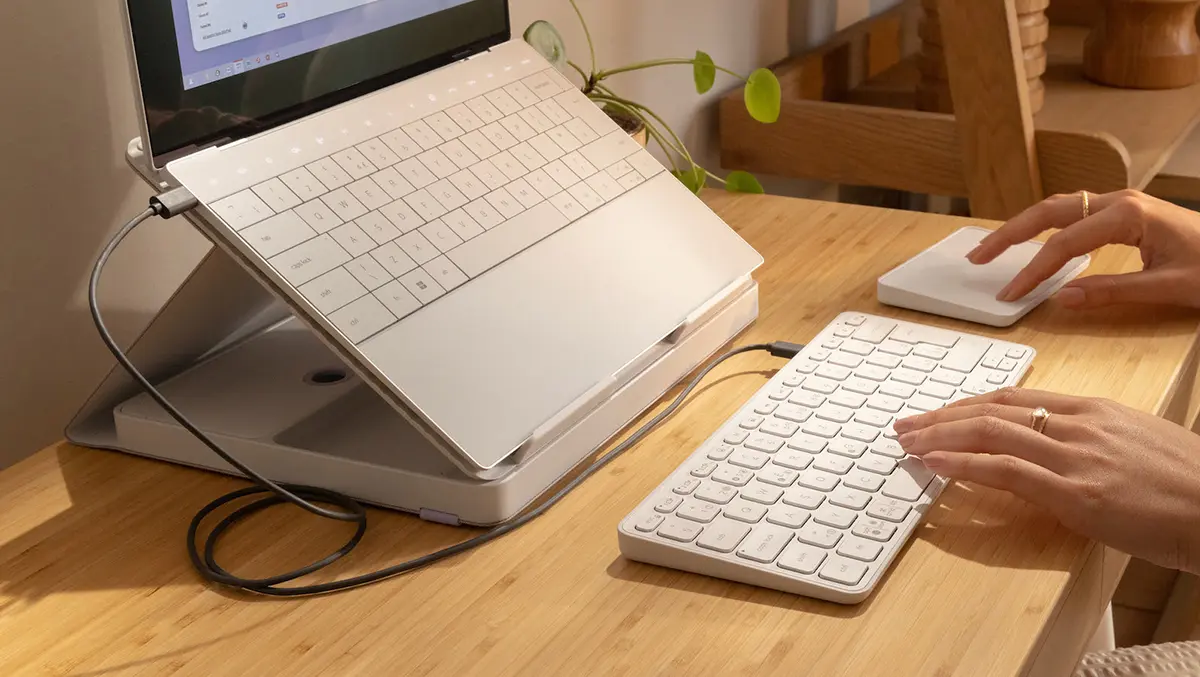
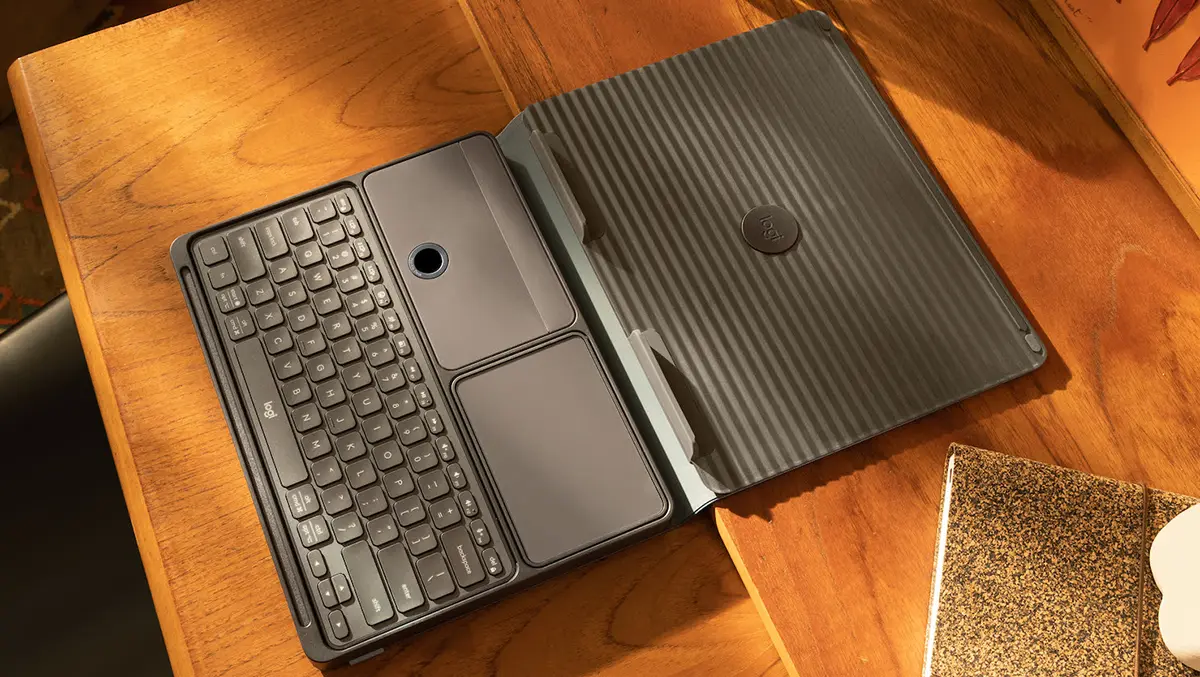
Closed, it resembles a slim fabric folio. The finish is soft and understated. It looks more like a home accessory than office hardware. Open it, and the design becomes clearer. The outer shell folds into a laptop stand, while a compact keyboard and touchpad sit neatly inside.
The concept is simple. Everything needed for a temporary workspace is stored in one place. It can be deployed quickly and packed away just as fast.
Design details
The case, known as the "book", forms the backbone of the product. It unfolds into a triangular stand that raises a laptop to a more comfortable height. The structure feels firm once locked into position. Magnets and folds guide the shape into place.
Inside, the keyboard and touchpad each have dedicated compartments. There is also space for a cable or small accessories. This level of organisation is central to the appeal. Nothing rattles loose in transit, and nothing needs to be carried separately.
Materials lean towards practicality. The exterior fabric resists marks and blends into domestic spaces. The internal plastics feel solid without adding excessive weight. It is not ultra-light, but it is manageable in a backpack.
Set-up ease
Set-up is quick after the first attempt. The folding pattern becomes familiar within a day. The stand opens in seconds and feels stable on most flat surfaces.
The keyboard and touchpad connect via Bluetooth. Each supports multiple device pairings. Switching between a laptop, tablet and secondary device is straightforward. This flexibility suits hybrid setups.
Software support adds extra features. Gesture controls and customisation are available through Logitech's companion app. Basic use does not require it, but the added control improves the experience.
Typing feel
The keyboard is one of the stronger elements. It is compact, but not cramped. Key spacing is sensible. The layout is familiar enough for touch typing after a short adjustment period.
Key travel is moderate. It sits closer to a laptop keyboard than a typical travel accessory. Feedback is soft but consistent. It is quiet enough for shared spaces.
There are trade-offs. The compact format means no number pad. Some keys are reduced in size. There is also no backlighting, which limits usability in low light.
For general office work, it performs well. Long typing sessions are comfortable. It is less suited to users who rely on full-size layouts or specialist keys.
Touchpad use
The touchpad is more mixed. It uses a glass surface and supports multi-touch gestures. For navigation and basic tasks, it works reliably.
Size is the main limitation. It is smaller than most laptop trackpads. That reduces precision in detailed work. Scrolling and gestures are responsive, but not always fluid.
The click mechanism has a slightly mechanical feel. It lacks the refinement of premium trackpads. Some users will adapt quickly. Others may prefer a separate mouse.
For light productivity, it is adequate. For creative work or extended editing, it feels less convincing.
Stand function
The stand is the defining feature. It raises the laptop screen to a more ergonomic position. This change is noticeable in daily use.
Posture improves immediately. The screen sits closer to eye level. Neck strain is reduced during longer sessions. This is the main benefit over working directly on a table.
The stand supports a wide range of laptop sizes. Smaller machines feel most stable. Larger laptops can be used, but the balance is less assured.
There is little adjustment. The height and angle are fixed once opened. If that position suits you, it works well. If not, there is no fine tuning.
Daily routine
The Casa Pop-Up Desk fits naturally into shared spaces. It can be stored on a shelf and brought out when needed. It avoids leaving a permanent work setup in view.
This matters in homes where space is limited. The ability to reset a room quickly is a practical advantage. It also reduces clutter during non-working hours.
Portability is reasonable. It adds weight to a bag, but replaces multiple accessories. The benefit is organisation rather than minimal weight.
Battery life is dependable. The keyboard lasts for extended periods between charges. The touchpad requires more frequent charging. Both use USB-C.
Sustainability
There is a focus on materials and longevity. Recycled plastics are used across key components. The packaging is sourced from managed materials.
The design encourages long-term use. The keyboard and touchpad are rechargeable. The case is durable enough for daily handling. This reduces the need for frequent replacements.
Limitations
The Casa Pop-Up Desk is not a universal solution. It works best within a narrow set of needs.
The touchpad is the weakest element. It does the job, but lacks refinement. Users who depend on precise control may find it limiting.
The stand offers only one position. That may not suit every user or environment. Larger laptops feel less stable than smaller ones.
The keyboard, while good, is still compact. It will not replace a full desktop setup for everyone.
Final word
The Casa Pop-Up Desk is a considered response to hybrid work habits. It brings together three essential tools into a single, organised package. The design focuses on simplicity and repeat use.
Its strengths are clear. The stand improves posture. The keyboard is comfortable. The overall system is easy to carry and quick to deploy.
Its weaknesses are also clear. The touchpad is average. Adjustability is limited. The concept only makes sense if all parts are used together.
For those working across multiple spaces, it offers a tidy and effective solution. For those with a fixed desk, it is less compelling.